


Complete Giada Collection Bundle
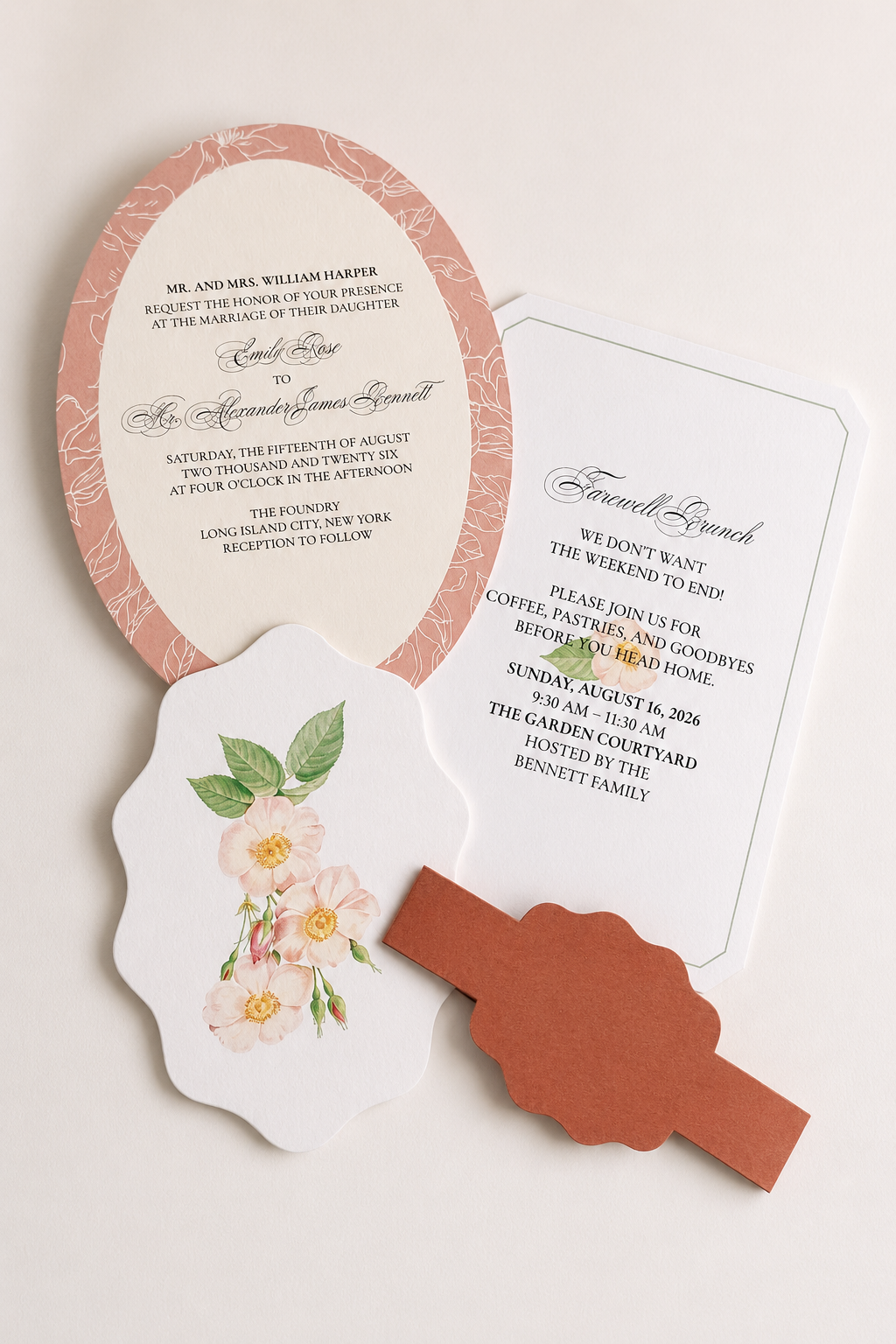
Includes all Print-and-Cut PNG templates featured in the Giada Collection, giving you the complete coordinated wedding stationery suite in one bundle.
Please visit each individual product page in the Giada Collection to view full product details, suggested sizes, cardstock recommendations, styling ideas, and How To Make It instructions.
Please note: Text templates are not included, giving you the freedom to add your own fonts and wording to each design.
The bundle includes coordinating templates for:
Text is not included. Names, table numbers, menu wording, invitation wording, program details, favor messages and other typography shown in styled examples are for inspiration only.
Permission is granted to use the template for personal or commercial projects of up to 500 units. This applies to a finished end product. It does not include permission to sell, share, publish, or redistribute the digital template itself.
2 Ways to Download
After completing checkout, select the download link on your order confirmation page. You will also receive an email containing a link to access your files. Please enter a valid email address at checkout and check your spam or junk folder if the email does not appear in your inbox.
Template License and Strict Resale Prohibition
All templates downloaded from mmakerr.com remain the intellectual property of Mmakerr and are provided to the original downloader under a limited, non-exclusive, non-transferable license.
Mmakerr templates may not be sold, resold, redistributed, sublicensed, shared, gifted, uploaded, published, transferred, or otherwise made available to another person or business—whether for free or for payment.
This prohibition applies to the original template and to any edited, customized, converted, or derivative version. Changing the colors, wording, fonts, layout, dimensions, file format, or other design elements does not create a new template or transfer ownership of the design.
You may not:
Any permission to use a template for personal or commercial projects applies only to the permitted finished end product. It never includes permission to sell, share, publish, or redistribute the digital template itself.
Templates may be imported into software such as Cricut Design Space only for your own authorized use. They may not be published, shared, listed, or made accessible to other users through the platform.
By downloading, accessing, or using a Mmakerr template, you agree to these restrictions. Unauthorized use may result in termination of your license, suspension of your Mmakerr account, removal or takedown requests, and the pursuit of any rights and remedies available under applicable law.
© Mmakerr. All rights reserved.
Couldn't load pickup availability


Complete Giada Collection Bundle
Includes all Print-and-Cut PNG templates featured in the Giada Collection, giving you the complete coordinated wedding stationery suite in one bundle.
Please visit each individual product page in the Giada Collection to view full product details, suggested sizes, cardstock recommendations, styling ideas, and How To Make It instructions.
Please note: Text templates are not included, giving you the freedom to add your own fonts and wording to each design.
The bundle includes coordinating templates for:
Text is not included. Names, table numbers, menu wording, invitation wording, program details, favor messages and other typography shown in styled examples are for inspiration only.
Permission is granted to use the template for personal or commercial projects of up to 500 units. This applies to a finished end product. It does not include permission to sell, share, publish, or redistribute the digital template itself.
2 Ways to Download
After completing checkout, select the download link on your order confirmation page. You will also receive an email containing a link to access your files. Please enter a valid email address at checkout and check your spam or junk folder if the email does not appear in your inbox.
Template License and Strict Resale Prohibition
All templates downloaded from mmakerr.com remain the intellectual property of Mmakerr and are provided to the original downloader under a limited, non-exclusive, non-transferable license.
Mmakerr templates may not be sold, resold, redistributed, sublicensed, shared, gifted, uploaded, published, transferred, or otherwise made available to another person or business—whether for free or for payment.
This prohibition applies to the original template and to any edited, customized, converted, or derivative version. Changing the colors, wording, fonts, layout, dimensions, file format, or other design elements does not create a new template or transfer ownership of the design.
You may not:
Any permission to use a template for personal or commercial projects applies only to the permitted finished end product. It never includes permission to sell, share, publish, or redistribute the digital template itself.
Templates may be imported into software such as Cricut Design Space only for your own authorized use. They may not be published, shared, listed, or made accessible to other users through the platform.
By downloading, accessing, or using a Mmakerr template, you agree to these restrictions. Unauthorized use may result in termination of your license, suspension of your Mmakerr account, removal or takedown requests, and the pursuit of any rights and remedies available under applicable law.
© Mmakerr. All rights reserved.