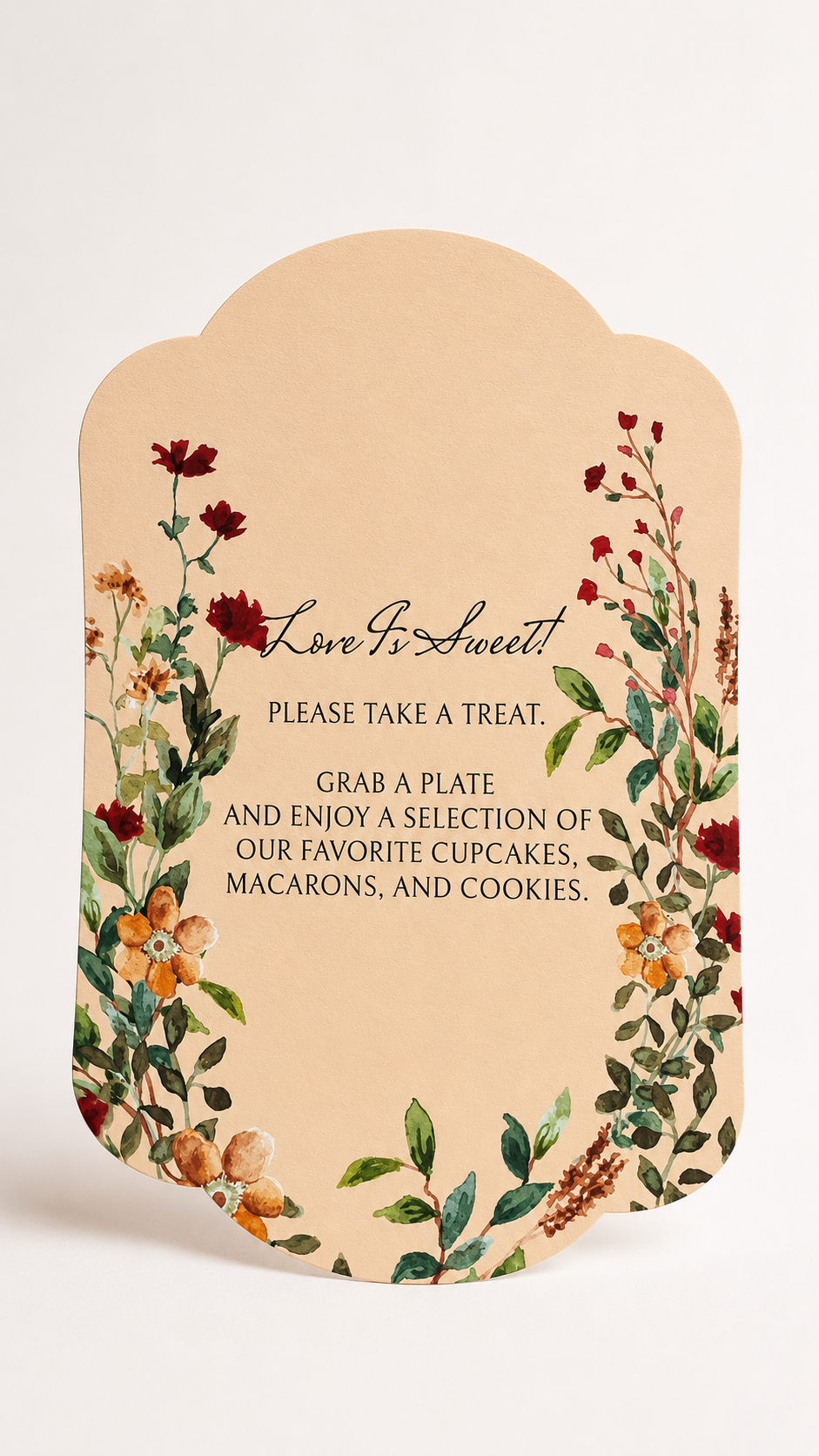
Floral Wedding Sign PNG Template | 2 Piece Print-and-Cut Wedding Signage with Flower Accent - Blythe Collection
Floral Wedding Sign PNG Template | 2 Piece Print-and-Cut Wedding Signage with Flower Accent - Blythe Collection
OVERVIEW
Create statement wedding signage with a beautiful layered look using this 2 piece wedding signage Print-and-Cut PNG template set. Designed for cutting machines like Cricut, this set includes a shaped main sign plus a separate floral accent that can be layered alongside it for extra dimension and a more custom, editorial finish.
The main sign features a soft scalloped silhouette with romantic watercolor florals, while the coordinating flower accent creates a dimensional botanical detail that can be displayed beside or slightly behind the sign.
The artwork comes pre-designed and pre-colored, so the decorative work is already done for you. An alternative white-background version is also included, giving you more freedom to pair the artwork with your own colored cardstock or wedding palette.
The suggested size is 7.857 x 11 inches for the main card and 4.376 x 10.666 inches for the floral accent, but both pieces can be resized to suit your project.
Please note: Text templates are not included, so you can personalize the sign using your own wording, font combinations, and text placement.
Why You'll Love It
- Two-piece layered design gives DIY signage a more custom, dimensional look
- Includes a separate floral accent that can be positioned and styled independently
- Made for Cricut and other compatible cutting machines
- Pre-designed floral artwork means you don't need to create the decorative elements yourself
- Includes pre-colored and white-background alternatives for more cardstock flexibility
- Distinctive shaped edges make the sign feel more elevated than a basic rectangular printable
- Easy to personalize with your own wording and fonts
- Both pieces are resizable, making the design useful for different displays and wedding setups
-
Coordinates beautifully with other floral wedding stationery and day-of details
Perfect For
This wedding signage template works beautifully for:
- Dessert table signs
- Favors signs
- Flip-flop or dancing shoes signs
- Guestbook stations
- Cards & gifts tables
- Welcome table signage
- Memorial tables
- Drink or cocktail stations
- Photo booth signs
- Wedding reception instructions
- Garden, floral, rustic, and romantic weddings
- DIY and semi-DIY wedding décor
Because the text is completely up to you, the same design can be used for virtually any wedding station that needs a larger sign.
WHAT'S INCLUDED
You will receive Print-and-Cut PNG templates for:
- Main shaped wedding sign
- Separate floral accent piece
- Alternative white-background versions for additional cardstock options
Suggested sizes:
- Main card: 7.857 x 11 inches
- Floral accent: 4.376 x 10.666 inches
Both pieces can be resized to suit your preferred display.
Important: Text templates, fonts, and sample wording are not included. Add your own wording and typography to create a sign that works specifically for your wedding.
Permission is granted to use the template for personal or commercial projects of up to 500 units. This applies to a finished end product. It does not include permission to sell, share, publish, or redistribute the digital template itself.
HOW TO MAKE IT
- Suggested Size -
For a finished look similar to the examples:
- Main sign: 7.857 x 11 inches
- Floral accent: 4.376 x 10.666 inches
These are suggested dimensions only. You can resize either piece to create smaller tabletop signage or a larger statement design.
- How to Make It -
- Upload the PNG files into Cricut Design Space or your preferred cutting-machine software.
- Resize the main sign and floral accent to your desired dimensions.
- Add your own wording to the main sign using the fonts and layout of your choice.
- Set the artwork up as a Print Then Cut / Print-and-Cut project.
- Print the pieces onto your chosen cardstock.
- Place the printed sheets onto your cutting mat.
- Use your Cricut or compatible cutting machine to cut around the shaped edges.
- Display the main card on its own, or position the separate floral accent beside or behind it for a layered effect.
-
Secure the pieces together with adhesive or foam mounting squares if you want them to function as one dimensional sign.
We recommend making one test piece first before producing your final wedding signage, especially if you resize the design.
- Cardstock Suggestions -
For a sturdy sign, consider:
- 100 lb to 120 lb cover cardstock
- Smooth matte cardstock
- Lightly textured cardstock for a more premium paper look
- White or warm-white cardstock for the most accurate reproduction of the pre-colored artwork
When using the white-background alternative, try layering the design with cardstock in colors such as:
- Warm ivory
- Cream
- Soft peach
- Terracotta
- Sage
- Olive
- Blush
- Dusty rose
- Warm neutral tones
For a sturdier freestanding sign, you can also mount the finished printed piece onto thicker cardstock, chipboard, or another rigid backing.
- Easy Personalization with Canva -
Want to add your initials, wedding date, monogram, or text? Create your text or graphic in Canva, remove the background, download it as a transparent PNG, and upload it into your cutting-machine software. Position it over the artwork before creating your final Print & Cut file.
- Styling Ideas -
Use the main sign by itself for a clean look, or layer the separate floral accent along one side to create a more dramatic botanical silhouette.
For added dimension, attach the floral piece with foam adhesive so it sits slightly above the main sign.
Display your finished signage using:
- Clear acrylic stands
- Gold tabletop holders
- Wood easels
- Decorative frames
- Brass stands
- Small tabletop easels
The design works especially well for signs such as “Love Is Sweet,” “A Little Treat for Your Dancing Feet,” “Please Sign Our Guestbook,” “Cards & Gifts,” “Take a Favor,” or any other wording that suits your celebration.
Pair it with matching table numbers, menus, place cards, invitation pieces, or envelope liners to carry the same floral artwork throughout your wedding for a beautifully cohesive look.
HOW TO DOWNLOAD
2 Ways to Download
After completing checkout, select the download link on your order confirmation page. You will also receive an email containing a link to access your files. Please enter a valid email address at checkout and check your spam or junk folder if the email does not appear in your inbox.
LICENSE & RESALE PROHIBITION
Template License and Strict Resale Prohibition
All templates downloaded from mmakerr.com remain the intellectual property of Mmakerr and are provided to the original downloader under a limited, non-exclusive, non-transferable license.
Mmakerr templates may not be sold, resold, redistributed, sublicensed, shared, gifted, uploaded, published, transferred, or otherwise made available to another person or business—whether for free or for payment.
This prohibition applies to the original template and to any edited, customized, converted, or derivative version. Changing the colors, wording, fonts, layout, dimensions, file format, or other design elements does not create a new template or transfer ownership of the design.
You may not:
- List or distribute the template through Freepik, Etsy, Cricut Design Space, Creative Market, another template marketplace, or any similar platform.
- Sell or share the template through your own website, online store, membership, social-media account, group, cloud folder, file-sharing service, or other distribution channel.
- Offer the template as an editable design, digital download, SVG, PNG, PDF, DXF, clipart file, design asset, bundle, or source file.
- Allow customers, clients, followers, subscribers, or other third parties to access, download, extract, edit, or reuse the template or its individual design elements.
- Claim the template or any modified version as your own work.
Any permission to use a template for personal or commercial projects applies only to the permitted finished end product. It never includes permission to sell, share, publish, or redistribute the digital template itself.
Templates may be imported into software such as Cricut Design Space only for your own authorized use. They may not be published, shared, listed, or made accessible to other users through the platform.
By downloading, accessing, or using a Mmakerr template, you agree to these restrictions. Unauthorized use may result in termination of your license, suspension of your Mmakerr account, removal or takedown requests, and the pursuit of any rights and remedies available under applicable law.
© Mmakerr. All rights reserved.
Couldn't load pickup availability