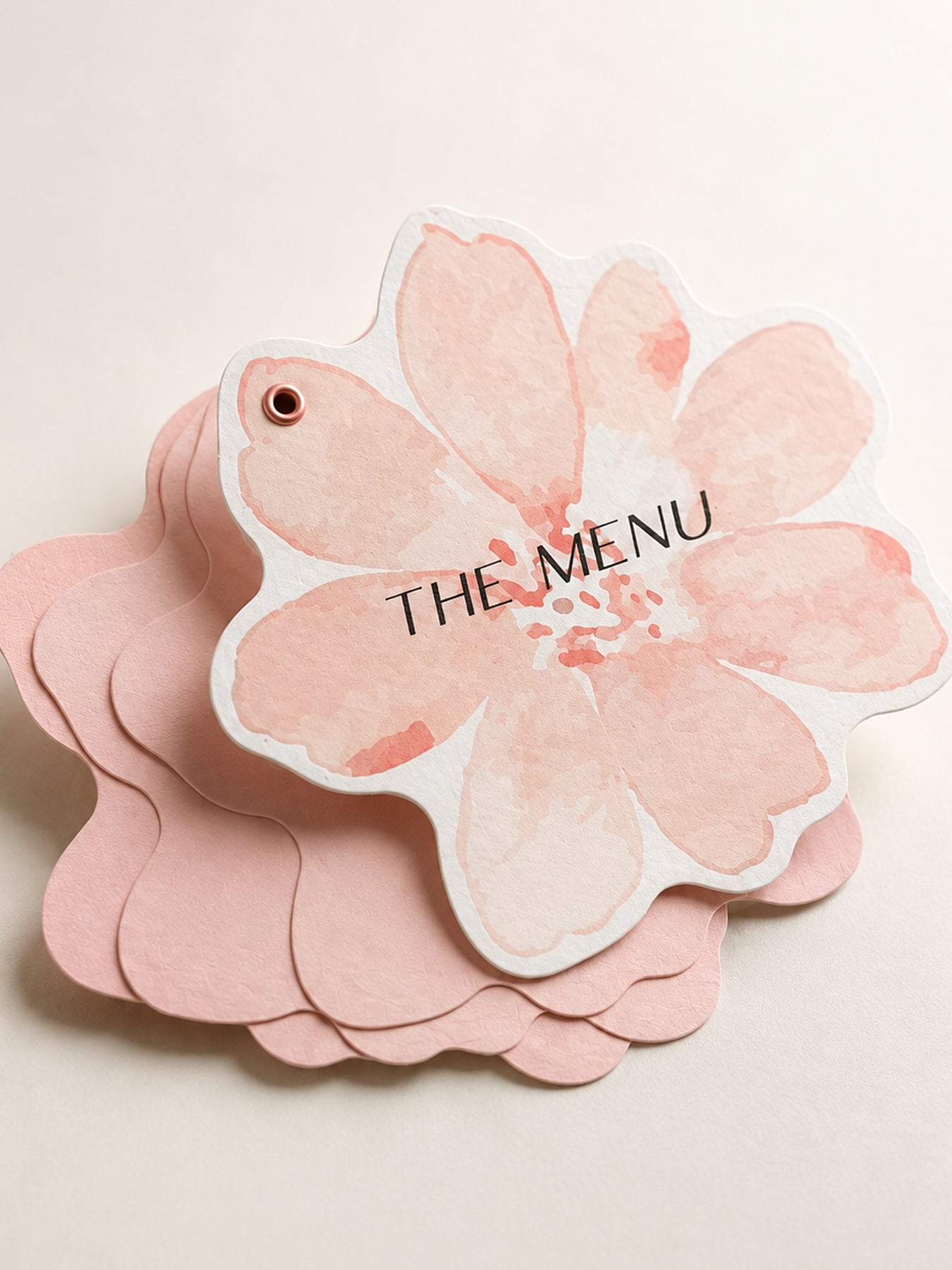
Multi-Page Wedding Menu Template | Blush Floral Booklet Menu PNG | Print & Cut Wedding Menu - Denise Collection
Multi-Page Wedding Menu Template | Blush Floral Booklet Menu PNG | Print & Cut Wedding Menu - Denise Collection
OVERVIEW
Turn your wedding menu into a beautiful little keepsake with this multi-page floral wedding menu template. Designed as a layered booklet rather than a traditional single card, this menu gives you separate pages for courses, drinks, desserts, late-night bites, or any other details you would like to share with your guests.
The cover features a soft pre-colored blush watercolor flower design, while the coordinating inner pages are provided as a silhouette shape so you can cut them from the cardstock color of your choice. Stack the pages together and secure them at one point to create a menu that guests can flip or fan open at their place setting.
The design is intentionally flexible, so you can create as few or as many inner pages as your menu requires.
Please note: The wording and typography shown in the styled examples are for inspiration only. Text is not included. Add your own menu wording, fonts, course names, and personalization to create a design that fits your celebration.
Why You'll Love It
- Designed for Print Then Cut with Cricut and compatible cutting machines
- A distinctive multi-page wedding menu instead of a traditional flat menu card
- Pre-designed blush floral cover for an instantly romantic look
- Coordinating shaped inner pages create a polished, custom stationery feel
- Add as many menu pages as you need
- Choose your own cardstock colors for the inner pages
- Perfect for separating individual courses or menu sections
- Can be resized to complement your place settings
- Easy to coordinate with your wedding colors, table linens, and other stationery
- Makes a beautiful decorative detail when placed on each guest's plate
Perfect For
- Wedding reception menus
- Multi-course dinner menus
- Formal plated dinners
- Family-style wedding menus
- Tasting menus
- Rehearsal dinners
- Bridal showers
- Engagement dinners
- Anniversary celebrations
- Dinner parties
- Garden and floral weddings
- Romantic blush wedding themes
You can use separate pages for starters, first courses, mains, desserts, drinks, wine pairings, late-night snacks, or special notes to guests.
WHAT'S INCLUDED
- Pre-designed, pre-colored floral menu cover PNG file
- Coordinating silhouette PNG cut file/shape for the inner menu pages
Text template is not included. The downloadable design provides the floral artwork and coordinating shapes, leaving you free to use your own fonts, wording, and menu layout.
Permission is granted to use the template for personal or commercial projects of up to 500 units. This applies to a finished end product. It does not include permission to sell, share, publish, or redistribute the digital template itself.
HOW TO MAKE IT
- Suggested Size -
For a compact booklet that works beautifully at an individual place setting, we suggest approximately: 5" × 4.767"
You can make the menu larger for a more dramatic presentation or slightly smaller for compact place settings.
- How to Make It -
Personalize your cover and individual menu pages with your own wording. Print and cut the floral cover, then cut as many coordinating inner pages as you need from your chosen cardstock.
Stack the pages together and secure them near one edge so guests can flip, rotate, or fan through the different courses.
The styled example uses a small eyelet, but you could also assemble your menu with a mini brad, decorative fastener, ribbon, book ring, or another method that suits your wedding style.
- Cardstock Suggestions -
For the floral printed cover, try:
- Smooth matte white cardstock
- Eggshell cardstock
- Lightly textured white cardstock
- Approximately 80–110 lb cover
A white or soft ivory printable cardstock will usually reproduce the watercolor artwork most accurately.
For the inner pages, try:
- Blush or dusty pink cardstock
- Soft ivory
- Cream
- Sage green
- Warm beige
- Coordinating wedding-color cardstock
Using solid colored cardstock for the inner pages is an easy way to bring your wedding palette into the design without changing the floral cover.
- Easy Personalization with Canva -
Want to add your initials, wedding date, monogram, or text? Create your text or graphic in Canva, remove the background, download it as a transparent PNG, and upload it into your cutting-machine software. Position it over the artwork before creating your final Print & Cut file.
- Styling Ideas -
Create one page for each course for a true restaurant-style multi-course menu, or keep it simple with just two or three pages.
You can also:
- Alternate different cardstock colors between pages
- Add a coordinating eyelet in blush, gold, silver, or your wedding color
- Use a miniature gold or pearl brad for a more formal finish
- Add a tiny ribbon or tassel to the fastening point
- Print the couple's names or wedding date on the cover
- Use the final page for a thank-you message
- Add wine pairings or cocktail selections on a separate page
- Personalize each menu with the guest's name so it doubles as a place card
- Place the finished booklet directly on each dinner plate or napkin
The result is a playful but polished wedding detail that feels much more custom than a standard menu card while still being approachable for a DIY or semi-DIY wedding project.
HOW TO DOWNLOAD
2 Ways to Download
After completing checkout, select the download link on your order confirmation page. You will also receive an email containing a link to access your files. Please enter a valid email address at checkout and check your spam or junk folder if the email does not appear in your inbox.
LICENSE & RESALE PROHIBITION
Template License and Strict Resale Prohibition
All templates downloaded from mmakerr.com remain the intellectual property of Mmakerr and are provided to the original downloader under a limited, non-exclusive, non-transferable license.
Mmakerr templates may not be sold, resold, redistributed, sublicensed, shared, gifted, uploaded, published, transferred, or otherwise made available to another person or business—whether for free or for payment.
This prohibition applies to the original template and to any edited, customized, converted, or derivative version. Changing the colors, wording, fonts, layout, dimensions, file format, or other design elements does not create a new template or transfer ownership of the design.
You may not:
- List or distribute the template through Freepik, Etsy, Cricut Design Space, Creative Market, another template marketplace, or any similar platform.
- Sell or share the template through your own website, online store, membership, social-media account, group, cloud folder, file-sharing service, or other distribution channel.
- Offer the template as an editable design, digital download, SVG, PNG, PDF, DXF, clipart file, design asset, bundle, or source file.
- Allow customers, clients, followers, subscribers, or other third parties to access, download, extract, edit, or reuse the template or its individual design elements.
- Claim the template or any modified version as your own work.
Any permission to use a template for personal or commercial projects applies only to the permitted finished end product. It never includes permission to sell, share, publish, or redistribute the digital template itself.
Templates may be imported into software such as Cricut Design Space only for your own authorized use. They may not be published, shared, listed, or made accessible to other users through the platform.
By downloading, accessing, or using a Mmakerr template, you agree to these restrictions. Unauthorized use may result in termination of your license, suspension of your Mmakerr account, removal or takedown requests, and the pursuit of any rights and remedies available under applicable law.
© Mmakerr. All rights reserved.
Couldn't load pickup availability