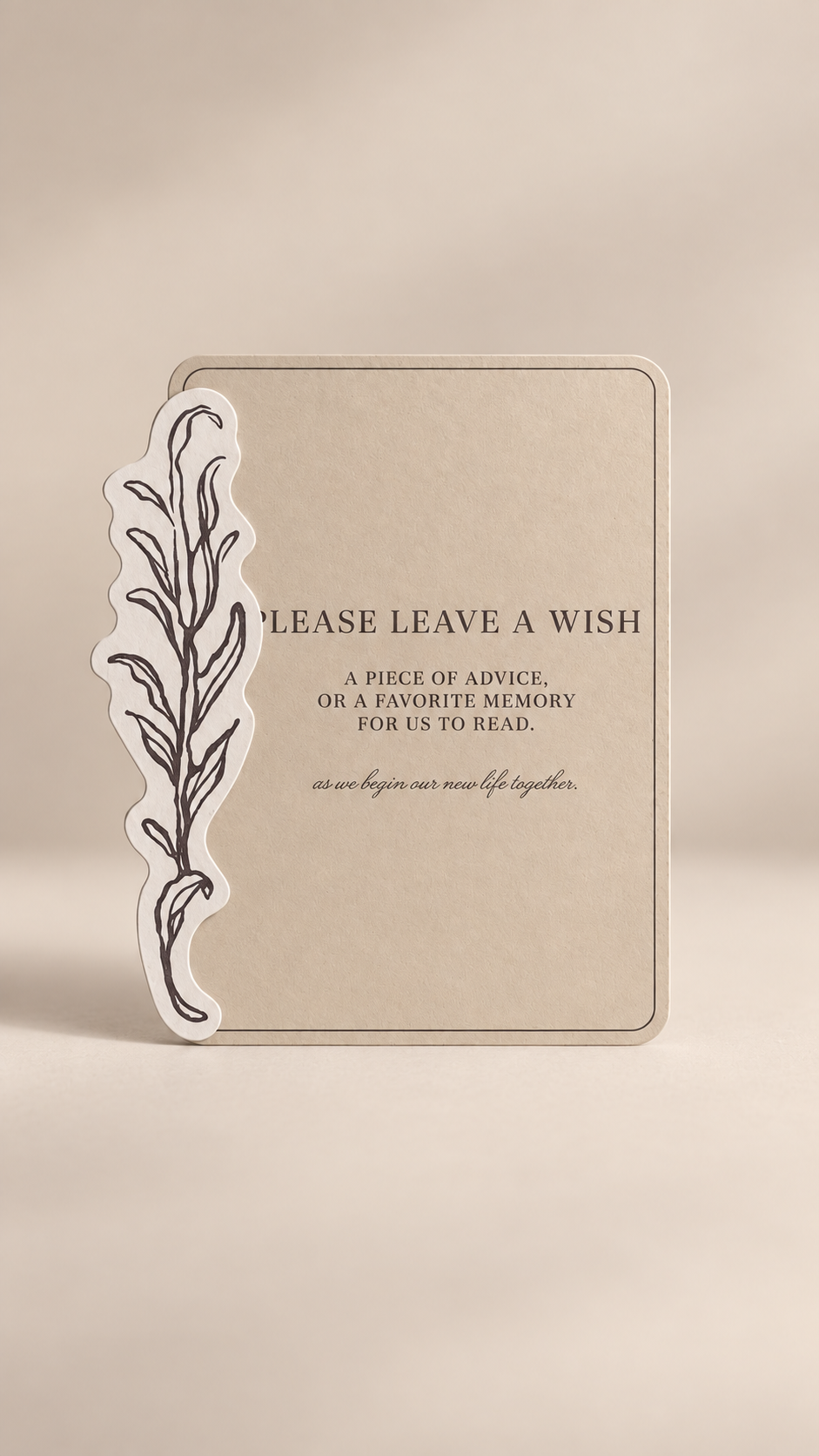
Set of 3 Layered Wedding Table Signage PNG Templates | 5x7 Print and Cut Wedding Signs - Isabel Collection
Set of 3 Layered Wedding Table Signage PNG Templates | 5x7 Print and Cut Wedding Signs - Isabel Collection
OVERVIEW
Create a beautifully coordinated wedding setup with this set of 3 layered table signage Print-and-Cut PNG templates. Designed for cutting machines like Cricut, these templates help you make elegant table signs with a dimensional, layered look that feels refined, polished, and thoughtfully styled.
Each sign is pre-designed, so you can skip the hard part and enjoy a professional-looking result while still making it your own. The layered format pairs a classic 5" x 7" main card with decorative accent pieces, giving each sign extra visual interest and a custom stationery feel.
Because text templates are not included, you have the freedom to add your own fonts, headings, and wording to suit your wedding perfectly—whether you are creating signs for your guestbook table, cards and gifts table, memory table, favors, welcome area, or any other reception station.
Why You'll Love It
- Set of 3 coordinating sign templates for a cohesive wedding look
- Layered design adds depth and a more custom, elevated finish
- Perfect for Print and Cut with Cricut and similar cutting machines
- Pre-designed so you can create beautiful signage without starting from scratch
- Lets you use your own wording and fonts to match your wedding style
- Easy to coordinate with your invitations, menus, place cards, and other paper details
-
Resizable if you want to adjust the signs for your display setup
Perfect For
- Guestbook table signs
- Cards and gifts table signs
- Wishes and advice table signs
- Favors table signs
- Memory table signs
- Welcome or information table signage
- DIY and semi-DIY brides
- Cricut and cutting-machine wedding projects
- Elegant, romantic, modern, and garden-inspired weddings
WHAT'S INCLUDED
Your digital file set includes:
3 layered wedding table signage PNG templates
- 3 main card templates
- 3 coordinating decorative accent templates
Suggested sizes:
- Main card: 5" x 7"
- Accent 1: 2.414" x 4.526"
- Accent 2: 6.119" x 7"
- Accent 3: 5.842" x 7"
Please Note: Text templates are not included. This allows you to customize each sign with your own fonts, wording, names, or headings.
Permission is granted to use the template for personal or commercial projects of up to 500 units. This applies to a finished end product. It does not include permission to sell, share, publish, or redistribute the digital template itself.
HOW TO MAKE IT
- Suggested Size -
The recommended sizes are:
- Main card: 5" x 7"
- Accent 1: 2.414" x 4.526"
- Accent 2: 6.119" x 7"
- Accent 3: 5.842" x 7"
You may resize the templates to suit your project and display preferences.
- How to Make It -
Add your own wording to each main sign using your preferred design software, then upload the finished PNG files into your cutting-machine software as Print Then Cut images.
Print the main sign cards and their matching accent pieces separately, then cut them using your Cricut or compatible machine. Once cut, attach each decorative accent to its corresponding main card using glue, double-sided adhesive, or foam adhesive for extra dimension.
Display the finished signs in small frames, acrylic stands, easels, or tabletop holders to complete your wedding setup.
- Cardstock Suggestions -
For best results, try:
- 100–130 lb cardstock for the main signs to keep them sturdy
- 80–110 lb cardstock for the layered accents
- Smooth cardstock for a crisp, clean look
- Lightly textured cardstock for a softer, more luxurious stationery feel
- Neutral, blush, sage, ivory, taupe, soft gray, or warm beige tones for an elegant finish
If printing at home, be sure to check your printer’s cardstock thickness limit before printing.
- Easy Personalization with Canva -
Want to add your initials, wedding date, monogram, or text? Create your text or graphic in Canva, remove the background, download it as a transparent PNG, and upload it into your cutting-machine software. Position it over the artwork before creating your final Print & Cut file.
- Styling Ideas -
These layered signs look especially beautiful when styled with candles, bud vases, linen runners, and floral arrangements on your reception tables or welcome displays. Use matching fonts and colors across all three signs to keep your wedding details feeling cohesive and intentional.
For a more dimensional look, use foam adhesive between the layers. For a softer romantic feel, pair the signs with delicate floral accents and silk ribbon. For a clean modern look, keep the typography minimal and display the signs in sleek stands or simple frames.
They also coordinate beautifully with matching invitation suites, menus, place cards, and table numbers for a wedding that feels polished from start to finish.
HOW TO DOWNLOAD
2 Ways to Download
After completing checkout, select the download link on your order confirmation page. You will also receive an email containing a link to access your files. Please enter a valid email address at checkout and check your spam or junk folder if the email does not appear in your inbox.
LICENSE & RESALE PROHIBITION
Template License and Strict Resale Prohibition
All templates downloaded from mmakerr.com remain the intellectual property of Mmakerr and are provided to the original downloader under a limited, non-exclusive, non-transferable license.
Mmakerr templates may not be sold, resold, redistributed, sublicensed, shared, gifted, uploaded, published, transferred, or otherwise made available to another person or business—whether for free or for payment.
This prohibition applies to the original template and to any edited, customized, converted, or derivative version. Changing the colors, wording, fonts, layout, dimensions, file format, or other design elements does not create a new template or transfer ownership of the design.
You may not:
- List or distribute the template through Freepik, Etsy, Cricut Design Space, Creative Market, another template marketplace, or any similar platform.
- Sell or share the template through your own website, online store, membership, social-media account, group, cloud folder, file-sharing service, or other distribution channel.
- Offer the template as an editable design, digital download, SVG, PNG, PDF, DXF, clipart file, design asset, bundle, or source file.
- Allow customers, clients, followers, subscribers, or other third parties to access, download, extract, edit, or reuse the template or its individual design elements.
- Claim the template or any modified version as your own work.
Any permission to use a template for personal or commercial projects applies only to the permitted finished end product. It never includes permission to sell, share, publish, or redistribute the digital template itself.
Templates may be imported into software such as Cricut Design Space only for your own authorized use. They may not be published, shared, listed, or made accessible to other users through the platform.
By downloading, accessing, or using a Mmakerr template, you agree to these restrictions. Unauthorized use may result in termination of your license, suspension of your Mmakerr account, removal or takedown requests, and the pursuit of any rights and remedies available under applicable law.
© Mmakerr. All rights reserved.
Couldn't load pickup availability